
Search Form
Output Format
Advanced Integration
Search Options
Indexing Options
Activity Reports
Troubleshooting FAQs
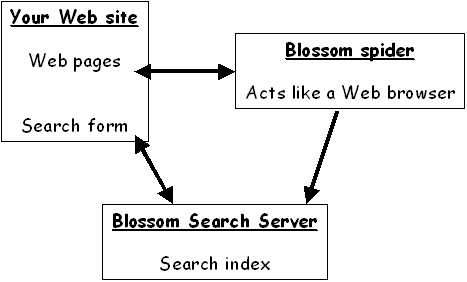
The figure below shows how Blossom's Search service works. A Blossom Web Spider visits your website periodically to build and update a search index. A search form on your site sends search requests to a Blossom Search Server and it responds with the search results.
Here are the steps to setting up the service:
- Create a search form.
- Optionally, customize the appearance of the search results and the operation of the search engine.
A Guide to the Guide
The Search Guide is divided into seven main sections:- Search Form. Start here. This section describes how to create a simple search form. All of the other sections assume that you can create a form and that the form can access your search index.
- Output Format. This section describes how to control the format of the search results. The format may be controlled by HTML placed in head and tail files, by options placed in the search form, and by cascading style sheets.
- Search Options. This section describes how to control the content of the search results. For example, you can control how strict searching is, how many results are delivered per page, and how the results are ordered.
- Indexing Options. This section describes how to control the Blossom spider, such as specifying the path and type of documents to include in the index. It also describes fine-grained controls on indexing, such as eliminating text from part of a page and explicitly setting the importance of a page.
- Activity Reports. Describes how to access Search Activity Reports and how to add a "most popular searches" feature to your website.
- Troubleshooting. If something isn't working, look here for descriptions of common problems.
- FAQs. The list of Frequently Asked Questions.